Menu

Quick Start

Quick Start

This step-by-step guide will show you how to install and configure the GooDoc plugin to work on your WordPress site.

1. Go to the Downloads page and download the zip-file of the plugin to your computer.

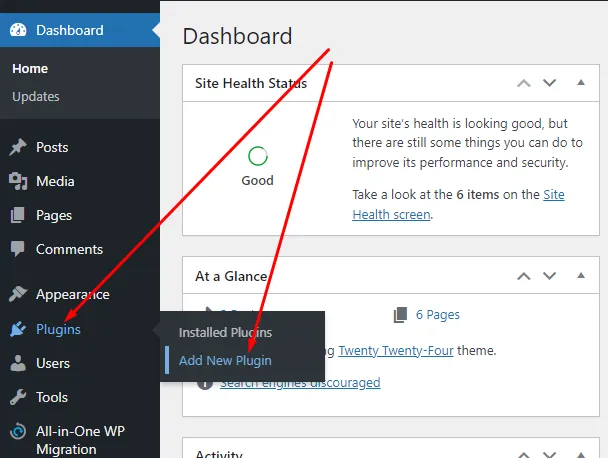
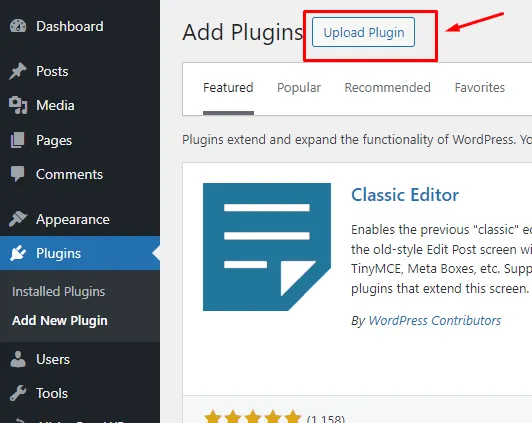
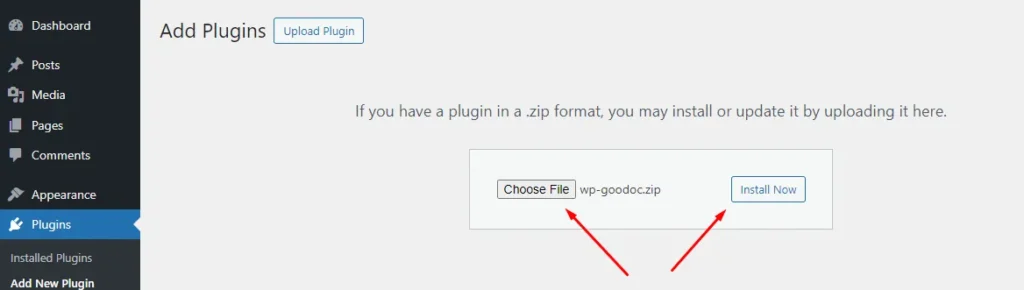
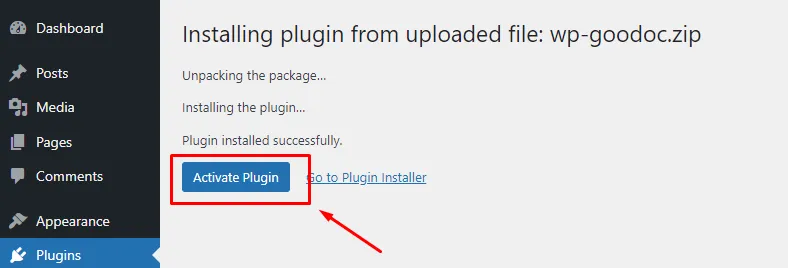
2. Install the plugin on your WordPress website. Here’s one way:

Now the installation of the plugin is complete.

3. Create an account on our website. To do this, go to the Authorization page and click the Sign in with Google button. Follow the instructions in the authorization wizard. Allow the service to access your Google Docs. Without this, it will not be possible to import Google Docs to your site.
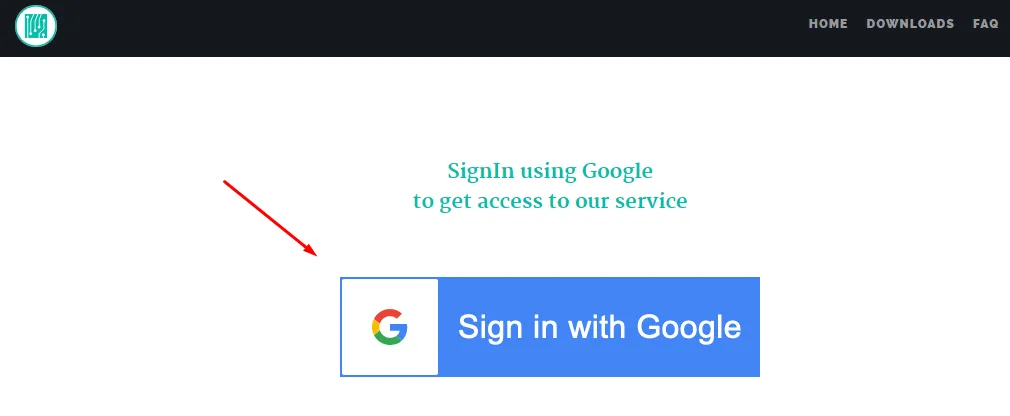
Some explanation: In order for the plugin to be able to import content from Google Docs directly to your WordPress site, it needs access to the Google API. To save you from configuring API settings, the plugin uses a server (this site) that is an intermediary between your WordPress site and your Google Docs. To do this, you need to register on our service.

After completing the registration, an email will be sent to the email address you used to log in, containing an access token to the service.

Please keep it in a safe place. Keep in mind that unauthorized access to the token may allow third parties to access the content of your Google Docs. If necessary, you can invalidate this token and get a new one. You can do this on the Account page.

4. Go to the Dashboard of your WordPress site and finish configuring the plugin. To do this, select GooDoc Options in the GooDoc Import menu item.
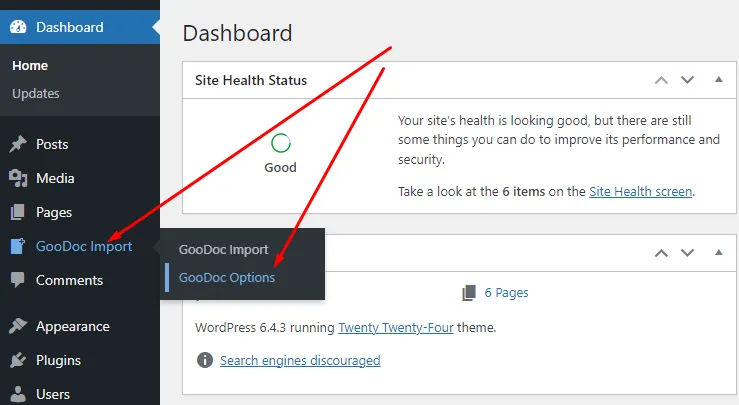
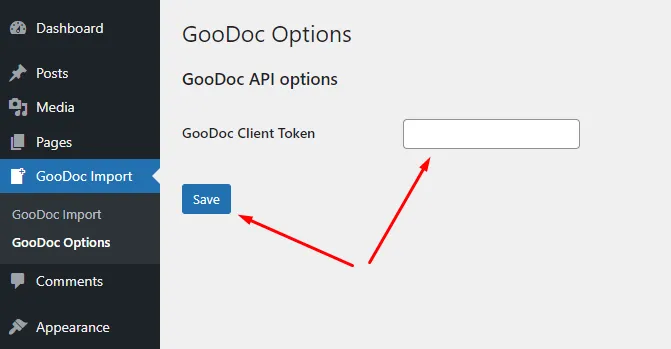
Then, on the page that opens, in the GooDoc Client Token field, copy and paste the token you received earlier in the email. Save it by clicking the Save button.
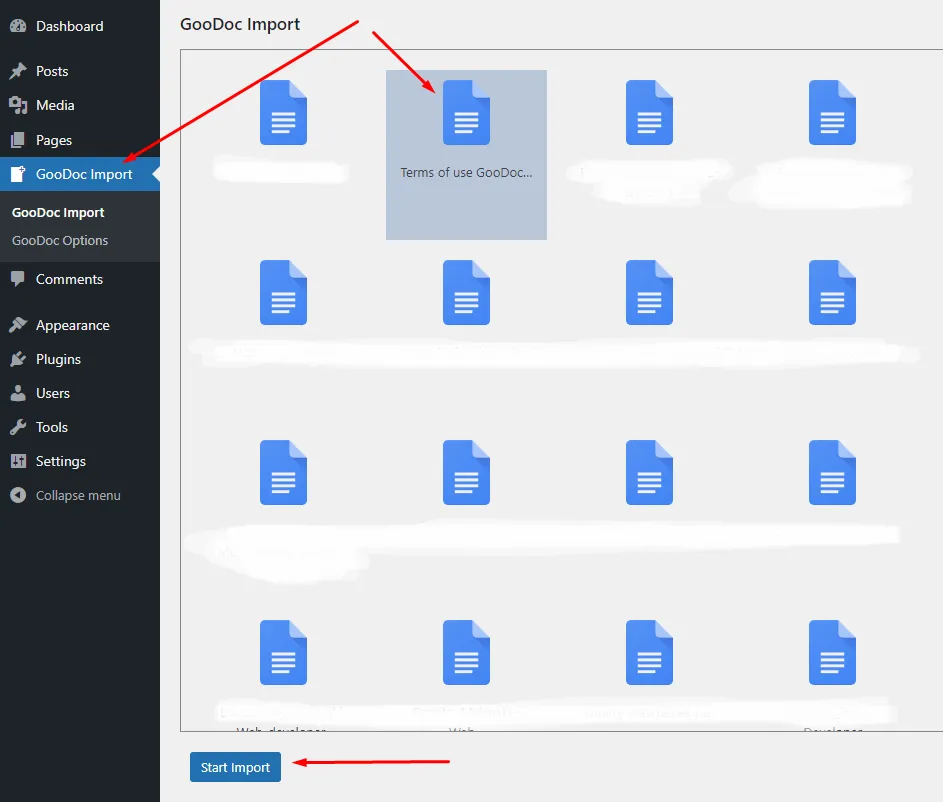
5. Now you can go to the import page by selecting the GooDoc Import menu item, select the desired document and import it to your WordPress site by clicking the Start Import button.
We use cookies to personalise content and ads, to provide social media features and to analyse our traffic. We also share information about your use of our site with our social media, advertising and analytics partners. View more
Cookies settings
Accept
Privacy & Cookie policy
Privacy & Cookies policy
Cookie name Active

Privacy Policy

Website: GooDoc (https://doc-r.com) (hereinafter referred to as the "Website") WordPress plugin: GooDoc  (hereinafter referred to as the "Plugin") Website Owner: Dzmitry Makarski Date: 02-03-2024

1. General Provisions

1.1. This Privacy Policy (hereinafter referred to as the "Policy") establishes the rules for the processing and protection of personal data of the Website Users. 1.2. Personal data is any information relating to a directly or indirectly determined or determinable natural person (data subject). 1.3. By using the Website and the Plugin, the User expresses his/her consent to the terms of this Policy. 1.4. The Website Owner has the right to make changes to the Policy. When making changes to the Policy, the Website Owner notifies the Users by posting a new version of the Policy on the Website.

2. Information Collected on the Website

The Website collects the following personal data of the Users:
    • Email address (upon registration).

3. Purposes of Personal Data Processing

3.1. Personal data of the Users is processed for the following purposes:
    • Providing access to the Website's features;
    • Communicating with the Users;
    • Improving the Website's performance.

4. Storage and Use of Personal Data

4.1. Personal data of the Users is stored on the servers of the Website Owner. 4.2. The Website Owner does not transfer personal data of the Users to third parties, except in cases provided for by law. 4.3. The Website Owner takes all necessary measures to protect personal data of the Users from unauthorized access, modification, use, disclosure, transfer, or destruction.

5. Use of cookies

5.1. What are cookies? Cookies are small text files that a website stores on your device (computer, smartphone, tablet) when you visit it. 5.2. What cookies do we use? We use two types of cookies:
    • Necessary cookies: These cookies are essential for the website to function. They allow you to use its features such as registration and login.
    • Analytics cookies: These cookies collect information about how you use the website. This information is used to improve the operation of the website and its content.
5.3. How can I disable cookies? You can disable cookies in your browser settings. However, this may cause some features of the website to not function properly.

6. User Rights

Users have the right to:
    • Access their personal data;
    • Request correction of their personal data;
    • Request deletion of their personal data;
    • Withdraw their consent to the processing of their personal data;
    • Appeal against the actions of the Website Owner in accordance with the law.

7. Contact Information

All questions regarding the processing of personal data may be addressed to the Website Owner by email: info@doc-r.com, or using the page Contact Us.

8. Final Provisions

8.1. This Policy is a legally binding document. 8.2. Use of the Website constitutes the User's unconditional consent to this Policy.
Save settings
Cookies settings